Canonical Tag Guide: Complete Implementation
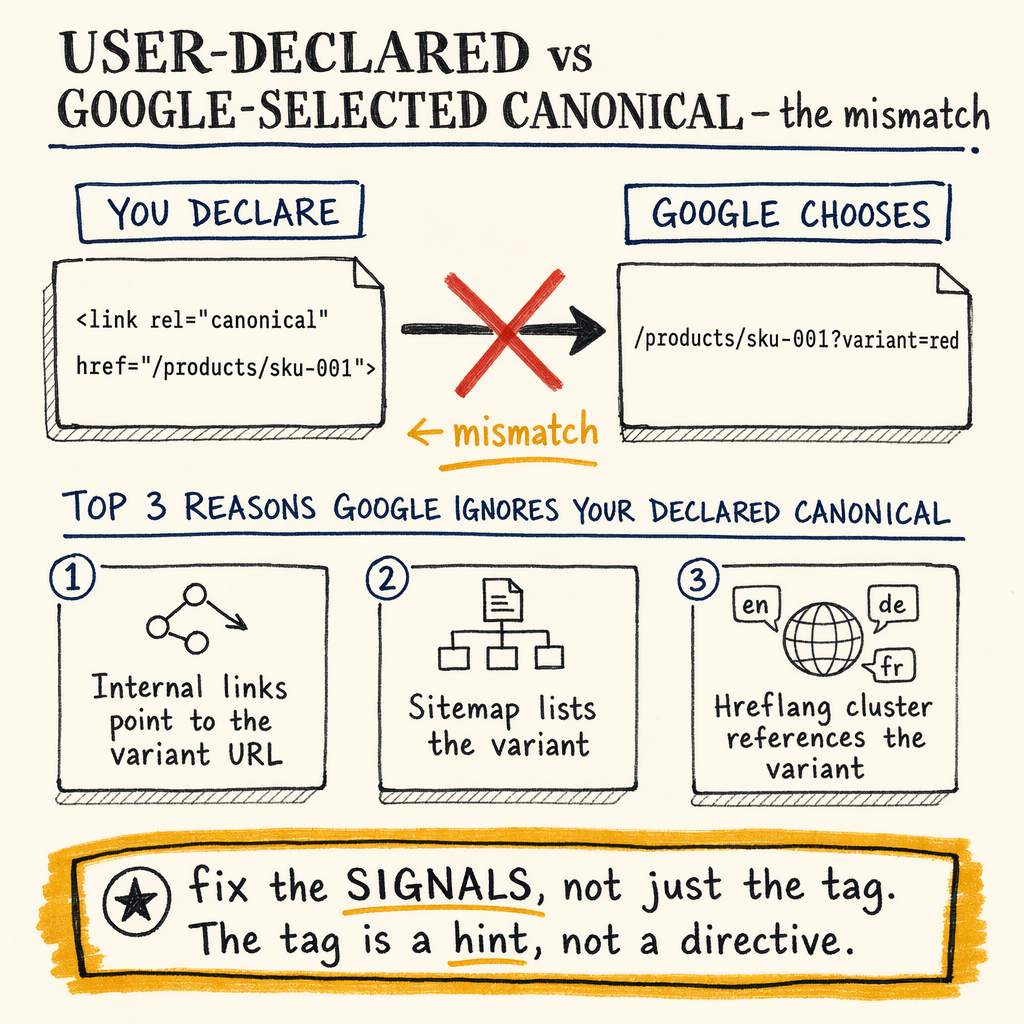
**7,950 organic clicks/month, 16,100 indexed pages, and 591,000 not indexed pages** is the kind of footprint where canonical mistakes turn into crawl waste fast. This guide separates the **user-declared canonical** from the **Google-selected canonical** and shows where `rel=canonical` actually holds.
What a canonical does
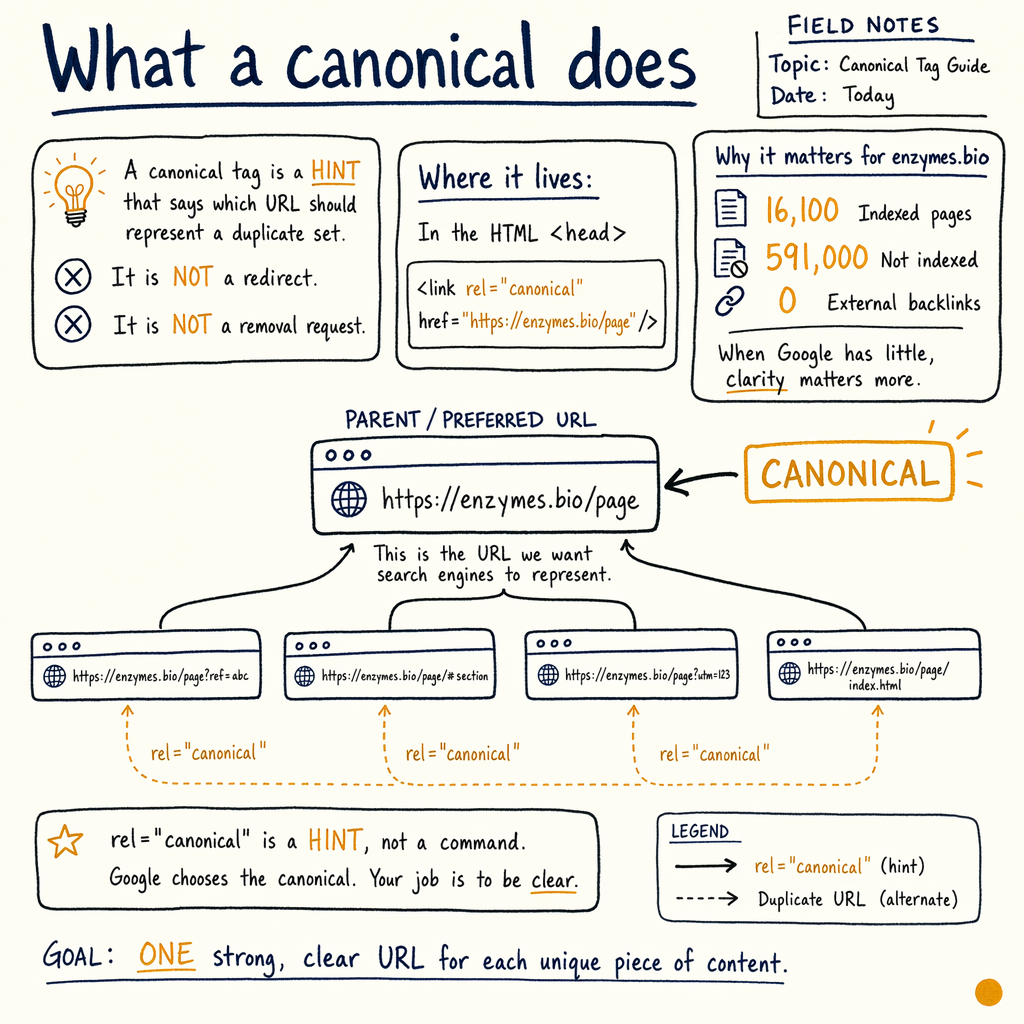
A canonical tag is a hint that says which URL should represent a duplicate set. It is not a redirect, and it is not a removal request. The tag lives in the HTML head as <link rel="canonical" href="...">.
For enzymes.bio, the scale matters: 16,100 indexed pages, 591,000 not indexed, and 0 external backlinks. When Google has little off-page signal to resolve duplication, the canonical signal becomes one of the few strong hints left.
Use canonicals when multiple URLs show the same or near-same content. That includes tracking parameters, print views, sort orders, session IDs, and language variants with duplicated paths. The goal is to collapse indexing signals to one URL, not to hide pages from users.
Declared vs selected canonical
| Field | User-declared canonical | Google-selected canonical |
|---|---|---|
Definition | The | The URL Google actually chooses in URL Inspection |
Control level | You set it | Google may ignore it |
Where to check | View source / rendered HTML | GSC URL Inspection |
Failure mode | Bad implementation, relative URL, cross-domain mismatch | Google picks a different page because signals conflict |
Best practice | Make it self-referencing on the preferred URL | Align internal links, redirects, sitemaps, and content |
Implementation rules
Use absolute URLs
href="https://example.com/page/" is safer than a relative path. Relative canonicals can resolve differently after templating, proxies, or localization.
Make preferred URLs self-referencing
The canonical URL should usually point to itself on the preferred page. That is the default for clean pages, and it prevents accidental drift across templates.
Keep one canonical per page
Multiple canonical tags in the same document create ambiguity. If two tags exist, Google may ignore both and choose based on other signals.
Match protocol, host, and trailing slash
http vs https, www vs non-www, and slash vs no slash are separate URLs. Pick one canonical form and force the others to resolve with 301s.
Do not canonicalize indexable pages to weak targets
If a page has unique demand, links, or commercial value, sending it to a broad category page can erase the wrong URL from the index.
Common canonical failures
The most common failures are boring and expensive. They do not usually break the site. They just make Google choose a different URL than the one you wanted.
The worst pattern is a clean user-declared canonical paired with messy signals elsewhere. If internal links, XML sitemaps, redirects, and on-page links all point somewhere else, Google often follows the crowd. That is why URL Inspection matters: it shows the Google-selected canonical, not just the tag you wrote.
At the scale of 557,000 impressions/month and a 1.4% sitewide CTR, even small canonical mismatches can dilute ranking signals across duplicates instead of concentrating them on the page that should rank.
Seven failure modes
- ✓
The canonical points to a 3xx, 4xx, or 5xx URL.
- ✓
The canonical is blocked by robots.txt or injected too late in the rendered DOM.
- ✓
Multiple canonicals exist because of template duplication.
- ✓
The canonical points to a non-equivalent page.
- ✓
Internal links mostly point to a different URL than the canonical.
- ✓
The XML sitemap lists non-canonical variants.
- ✓
Google-selected canonical in URL Inspection differs from the user-declared canonical and never converges after recrawl.
Self-referencing example
<head>
  <link rel="canonical" href="https://example.com/category/widget/" />
  <meta name="robots" content="index,follow" />
</head>

<!-- On the preferred URL, the canonical points to itself. -->
<!-- On duplicates, the canonical should still point to the preferred URL. -->
Canonical vs noindex
canonical and noindex solve different problems. A canonical consolidates duplicate signals. A noindex keeps a page out of the index.
If you need Google to ignore a duplicate page, noindex is stronger. If you want Google to index one preferred page out of several similar URLs, rel=canonical is usually the cleaner option. Do not stack them by default. If a page is noindex, Google may stop treating its canonical as a strong consolidation hint.
Use this duplicate-page fix guide when the wrong URL keeps surfacing, and this Google-chosen canonical guide when URL Inspection disagrees with your tag.
Parameter and faceted URLs
- 01
Classify the parameter
Ask whether the parameter changes content, sort order, filtering, tracking, or session state. Only content-changing parameters deserve indexation.
- 02
Pick the indexable version
Choose one clean URL for the crawl and index. Keep the filter state for users if needed, but canonicalize the variant URL to the clean version.
- 03
Align internal links
Navigation, breadcrumbs, and in-content links should point to the canonical URL. Don’t make Google reconcile conflicting signals from every module.
- 04
Check XML sitemaps
Only canonical URLs belong in sitemaps. If your sitemap includes parameterized variants, you are telling Google to waste crawl attention on duplicates.
- 05
Validate in GSC
Open
Indexing › Pages, then inspect sample URLs withPerformance › Search resultsand URL Inspection. Look for a stable Google-selected canonical after recrawl.
Hreflang and canonicals
hreflang and canonicals have to agree on the URL set. If language variants are canonicalized to the wrong locale, Google can collapse the cluster and ignore the alternate pages you need.
If the site has 35 languages via TranslatePress, the canonical pattern must stay predictable. Each language URL should self-canonicalize within its own locale unless the content is genuinely duplicated and you intentionally want one version to win.
For implementation details, pair this page with hreflang implementation guidance. The rule is simple: the canonical URL should belong to the same language version that the hreflang cluster references.
Audit in GSC
Start with Indexing › Pages to find duplicate clusters, excluded URLs, and canonicalization patterns at scale. Then open Performance › Search results to compare clicks, impressions, and average position for the URLs you want indexed.
The other report that matters is Links › External links. On enzymes.bio, the rate-limiter is 0 external backlinks. That means Google has fewer external signals to help separate canonical candidates, so internal consistency matters more than usual.
Also check Settings › Crawl stats. If Googlebot is spending too much time on parameter URLs, canonical noise is probably leaking into the crawl path. Pair that with Indexing › Sitemaps to confirm only preferred URLs are being submitted.
GSC inspection workflow
# 1) Check the URL in Google Search Console URL Inspection
# 2) Compare these fields:
#    - User-declared canonical
#    - Google-selected canonical
#    - Crawled as
# 3) Re-test after recrawl

curl -I https://example.com/page/?utm_source=test

# Expect either:
# 301 Moved Permanently to the canonical URL
# or a 200 with a correct rel=canonical in the HTML head
Schema and head sample
{
  "@context": "https://schema.org",
  "@type": "WebPage",
  "url": "https://example.com/page/",
  "mainEntityOfPage": "https://example.com/page/",
  "inLanguage": "en"
}

<!-- HTML head -->
<link rel="canonical" href="https://example.com/page/" />
<link rel="alternate" hreflang="en" href="https://example.com/page/" />
<link rel="alternate" hreflang="fr" href="https://example.com/fr/page/" />
Canonical checks before launch
One canonical, one target
Every indexable template should emit exactly one canonical tag and one preferred URL.
No canonical chains
A should not canonicalize to B if B canonicalizes to C. Keep the target final and stable.
No mixed signals
If the page is canonicalized to /page/, internal links, breadcrumbs, and sitemap entries should also use /page/.
Redirects still matter
If the non-preferred version can 301 cleanly to the preferred version, do that first. Canonicals are not a substitute for basic URL normalization.
Fix order and validation
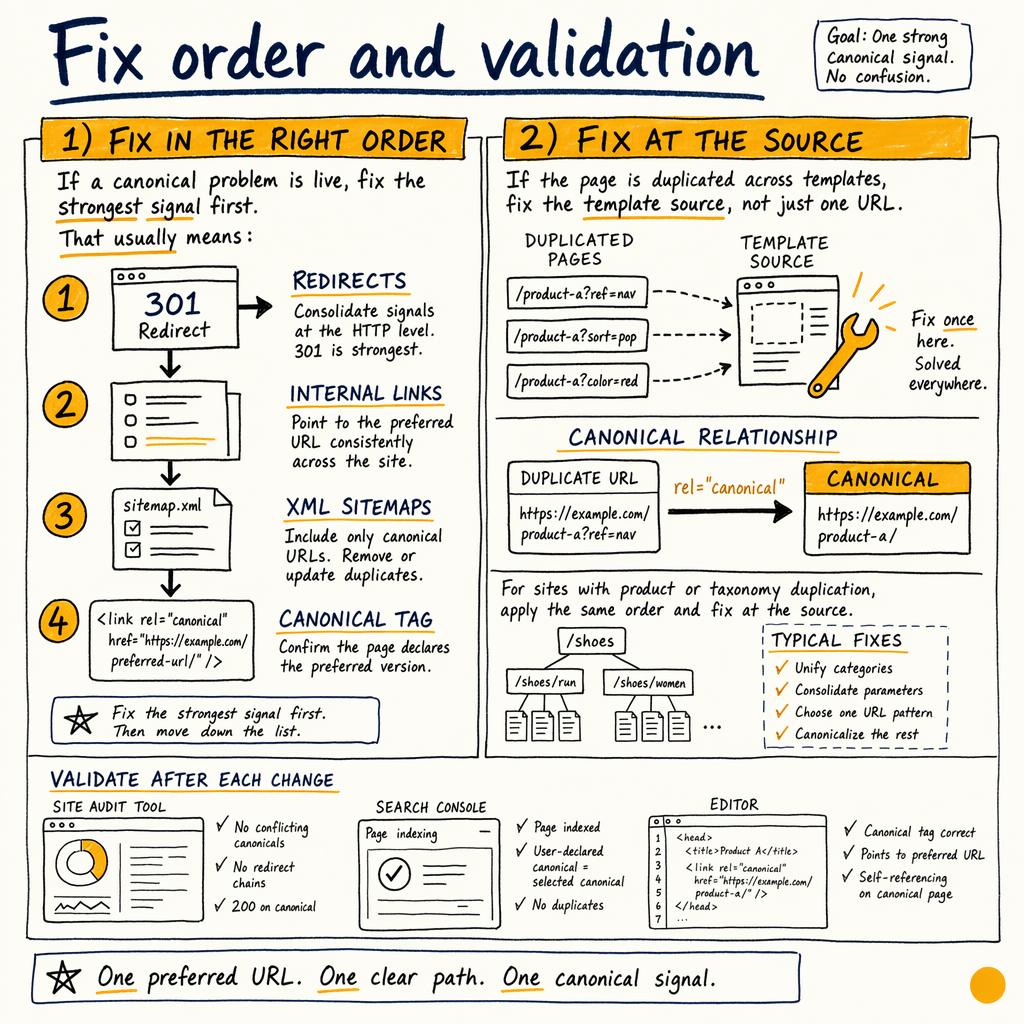
If a canonical problem is live, fix the strongest signal first. That usually means redirects, then internal links, then XML sitemaps, then the canonical tag itself. If the page is duplicated across templates, fix the template source, not just one URL.
For sites with product or taxonomy duplication, compare the canonical issue against 301 and 302 redirect patterns before you touch a single template. If the wrong URL remains indexed after cleanup, the next step is usually a focused technical SEO audit.
When the page is clean, Google often converges within a few recrawls. When it does not, the mismatch is usually elsewhere: internal links, redirects, hreflang, or content equivalence.
Canonical FAQ
Should every page have a canonical tag?
Usually yes for indexable HTML pages. Self-referencing canonicals are a safe default on preferred URLs, and duplicate variants should point to the preferred version.
Can Google ignore my canonical tag?
Yes. If the tag conflicts with redirects, internal links, sitemap entries, or content differences, Google may choose a different canonical URL.
What is the difference between user-declared and Google-selected canonical?
The user-declared canonical is the rel=canonical tag you emit. The Google-selected canonical is what URL Inspection reports after Google processes all signals.
Is canonical better than noindex?
They solve different problems. Canonical consolidates duplicates; noindex removes a URL from the index. Use the weaker tool only when it matches the outcome you need.
Do canonicals help with parameter URLs?
Yes, if the parameter does not change the main content. Canonicalize tracking and sort variants to the clean URL, and keep content-changing filters under review.
Can a canonical cross domains?
Yes, but only when the content relationship is clear and the destination is the preferred source. Cross-domain canonicals are easier to misuse, so validate them carefully.